文字阴影
h1 {text-shadow:5px 1px 3px #666;}
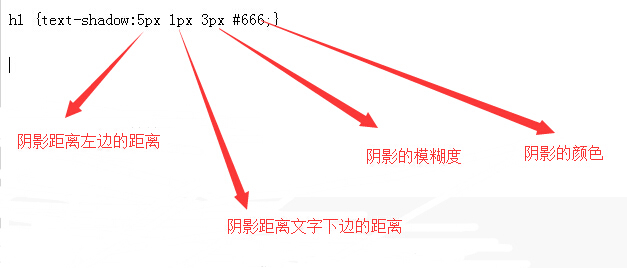
CSS中使用的一些特性
css选择偶数行或奇数行

#Ulist li:nth-of-type(odd){ margin-left: 20px;}奇数行
#Ulist li:nth-of-type(even){margin-left: 10px;}偶数行

以上两行就可以了


button:focus {
	border:none;
	outline:none;
	opacity:.6;
	filter:alpha(opacity=60)
}


清除浮动
.clear:after,.clear:before {
	content:"";
	display:table
}
.clear:after {
	clear:both
}
.clear {
	*zoom:1
}


在一个元素前后如何加元素?
.bodyBox {
	min-height:100%;
	margin:-43px 0 -128px 0
}
.bodyBox:before {
	content:'';
	display:block;
	width:100%;
	height:43px
}
.bodyBox:after {
	content:'';
	display:block;
	width:100%;
	height:128px
}

如何定义动画?

.mark .double-bounce1,.mark .double-bounce2 {
	width:100%;
	height:100%;
	border-radius:50%;
	background-color:#e15671;
	opacity:.6;
	position:absolute;
	top:0;
	left:0;
	-webkit-animation:bounce 2s infinite ease-in-out;
	animation:bounce 2s infinite ease-in-out
}
.mark .double-bounce2 {
	-webkit-animation-delay:-1s;
	animation-delay:-1s
}
@-webkit-keyframes bounce {
	0%,100% {
	-webkit-transform:scale(0)
	}
	50% {
		-webkit-transform:scale(1)
	}
}
@keyframes bounce {
	0%,100% {
		transform:scale(0);
		-webkit-transform:scale(0)
	}
	50% {
		transform:scale(1);
		-webkit-transform:scale(1)
	}
}
背景颜色怎么写:
nav .nav_main .loginBtn a {
display:inline-block;
float:right;
padding:0 13px;
background-image:-moz-linear-gradient(top,#cf4c68,#e15671);
background-image:-webkit-gradient(linear,left top,left bottom,color-stop(0,#cf4c68),color-stop(1,#e15671));
filter:progid:DXImageTransform.Microsoft.gradient(startColorstr=#cf4c68,endColorstr=#e15671,GradientType='0');
color:#ffdbe2;
font-size:12px;
height:100%;
line-height:23px;
border-right:1px solid #fff
}
.backTop {
width:83px;
height:99px;
background:url(../images/backTop.png) no-repeat;
position:fixed;
right:1%;
bottom:4%;
cursor:pointer;
z-index:99;
transform:rotate(-10deg);
-webkit-transform:rotate(-10deg);
-moz-transform:rotate(-10deg);
display:none
}
.backTop:hover {
transform:rotate(0deg);
-webkit-transform:rotate(0deg);
-moz-transform:rotate(0deg)
}