2.html
<html>
    <head>
        <title>box模型</title>
        <link rel="stylesheet" type="text/css" href="box.css">
        <link rel="stylesheet" type="text/css" href="2.css">
        <meta charset="utf-8" />
    </head>

    <body>

        <div class="ubox first">
             <div class="uf-8 info">info</div>
             <div class="uf-3 list">list</div>
             <div class="uf-1 set">set</div>
        </div>

        <div class="ubox first" style="margin:5px 0px;">
             <div class="uf-3 info">info</div>
             <div class="uf-2 list">list</div>
             <div class="uf-1 set">set</div>
        </div>


        <div style="color:#666;">
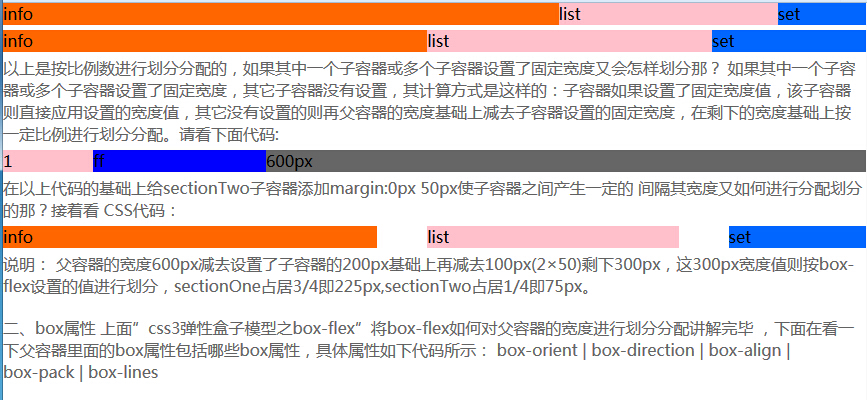
        以上是按比例数进行划分分配的,如果其中一个子容器或多个子容器设置了固定宽度又会怎样划分那?
        如果其中一个子容器或多个子容器设置了固定宽度,其它子容器没有设置,其计算方式是这样的:子容器如果设置了固定宽度值,该子容器则直接应用设置的宽度值,其它没有设置的则再父容器的宽度基础上减去子容器设置的固定宽度,在剩下的宽度基础上按一定比例进行划分分配。请看下面代码:
        </div>
        <article class="ubox" style="margin:5px 0px;">
            <section class="uf-1" style="background:pink;">1</section>
            <section class="uf-2" style="background:blue;">ff</section>
            <section class="set" style="width:600px;background:#666;">600px</section>
        </article>

        <div style="color:#666;">
            在以上代码的基础上给sectionTwo子容器添加margin:0px 50px使子容器之间产生一定的
            间隔其宽度又如何进行分配划分的那?接着看
            CSS代码:
        </div>

        <div class="ubox first" style="margin:5px 0px;">
             <div class="uf-3 info">info</div>
             <div class="uf-2 list" style="margin:0px 50px;">list</div>
             <div class="uf-1 set">set</div>
        </div>

        <div style="color:#666;">
            说明:
            父容器的宽度600px减去设置了子容器的200px基础上再减去100px(2×50)剩下300px,这300px宽度值则按box-flex设置的值进行划分,sectionOne占居3/4即225px,sectionTwo占居1/4即75px。
        </div>


        <div style="color:#666;margin:20px auto;">
            二、box属性
            上面”css3弹性盒子模型之box-flex”将box-flex如何对父容器的宽度进行划分分配讲解完毕
            ,下面在看一下父容器里面的box属性包括哪些box属性,具体属性如下代码所示:
            box-orient | box-direction | box-align | box-pack | box-lines
        </div>

        <div style="color:#666;margin:20px auto;">
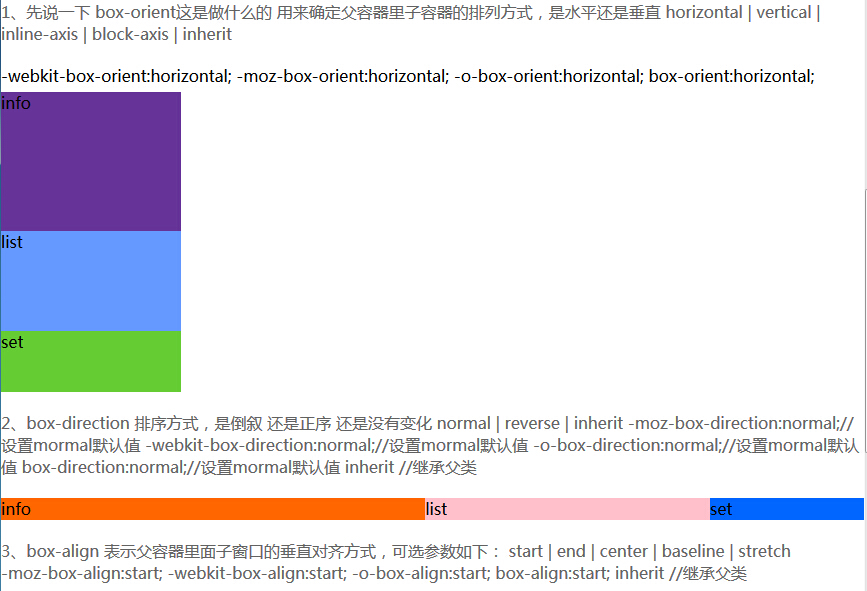
         1、先说一下 box-orient这是做什么的
            用来确定父容器里子容器的排列方式,是水平还是垂直
            horizontal | vertical | inline-axis | block-axis | inherit
        </div>
            -webkit-box-orient:horizontal;
            -moz-box-orient:horizontal;
            -o-box-orient:horizontal;
            box-orient:horizontal;


        <div class="ubox second ubox-s" style="margin:5px 0px;">
             <div class="uf-3 info">info</div>
             <div class="uf-2 list">list</div>
             <div class="uf-1 set">set</div>
        </div>


        <div style="color:#666;margin:20px auto;">
         2、box-direction
            排序方式,是倒叙 还是正序 还是没有变化
            normal | reverse | inherit
            -moz-box-direction:normal;//设置mormal默认值
            -webkit-box-direction:normal;//设置mormal默认值
            -o-box-direction:normal;//设置mormal默认值
            box-direction:normal;//设置mormal默认值

            inherit //继承父类
        </div>

        <div class="ubox first ubox-daoxu ubox-zhengxu" style="margin:5px 0px;">
             <div class="uf-3 info">info</div>
             <div class="uf-2 list">list</div>
             <div class="uf-1 set">set</div>
        </div>


        <div style="color:#666;margin:20px auto;">
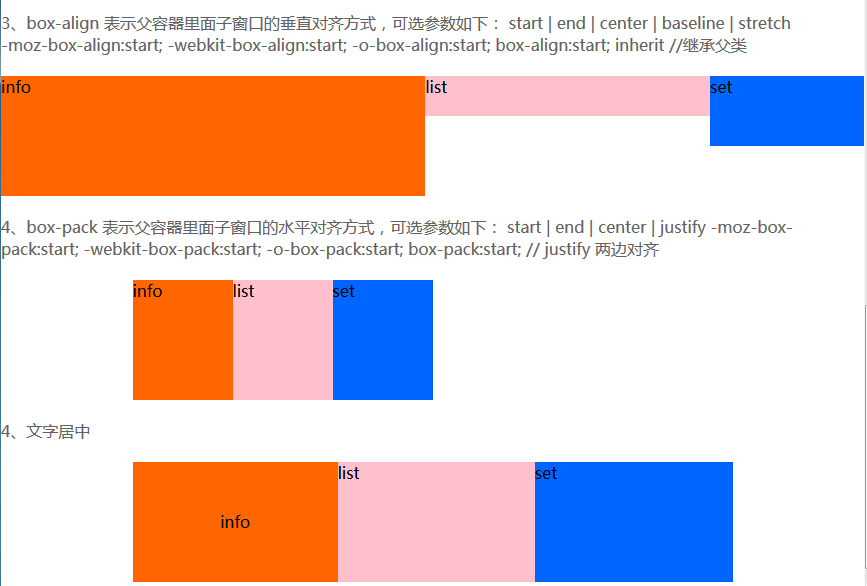
         3、box-align
            表示父容器里面子窗口的垂直对齐方式,可选参数如下:
            start | end | center | baseline | stretch
            -moz-box-align:start;
            -webkit-box-align:start;
            -o-box-align:start;
            box-align:start;


            inherit //继承父类
        </div>

        <div class="ubox first dq" style="margin:5px 0px; height:120px;">
             <div class="uf-3 info">info</div>
             <div class="uf-2 list" style="height:40px;">list</div>
             <div class="uf-1 set" style="height:70px;">set</div>
        </div>


        <div style="color:#666;margin:20px auto;">
         4、box-pack
            表示父容器里面子窗口的水平对齐方式,可选参数如下:
            start | end | center | justify

            -moz-box-pack:start;
            -webkit-box-pack:start;
            -o-box-pack:start;
            box-pack:start;

            // justify 两边对齐

        </div>

        <div class="ubox first ds" style=" width:600px; margin:5px auto; height:120px;">
             <div class="uw100 info">info</div>
             <div class="uw100 list" >list</div>
             <div class="uw100 set" >set</div>
        </div>


        <div style="color:#666;margin:20px auto;">
         4、文字居中

        </div>
        <div class="ubox first" style=" width:600px; margin:5px auto; height:120px;">
             <div class="uf-1 ubox ubox-f-c info">info</div>
             <div class="uf-1 list" >list</div>
             <div class="uf-1 set" >set</div>
        </div>

    </body>
</html>
box.css
body,div,h1,h2,h3,h4,h5,ol,ul,li,dl,dd,dt,span,p,b,i,input,select,textarea,pre,code,form,fieldset,legend,input,button,b{margin:0px; padding:0px;}
ul,ol,li{list-style:none;}
/**盒子模型
    box-align
    表示父容器里面子窗口的垂直对齐方式,可选参数如下:
    start | end | center | baseline | stretch
    -moz-box-align:start;
    -webkit-box-align:start;
    -o-box-align:start;
    box-align:start;

**/
/**盒子模型定义**/
.ubox{
    display:-webkit-box;
    display:-moz-box;
    display:-o-box;
    display:box;
    /*
    text-align:center; //使子元素中的文字均居中对齐
    ***/
}
/**文字 上下垂直剧中**/
/**如果还需要其他居中方式,按照这个要求去写代码即可**/
.ubox-f-c{
    /**要求:必须是一个单独的盒子  在标签上加上  ubox  然后加上. ubox-f-c 文字就可以上下左右居中对齐 **/
    /**左右居中**/
    -moz-box-pack:center;
    -webkit-box-pack:center;
    -o-box-pack:center;
    box-pack:center;

    /**垂直居中**/
    -moz-box-align:center;
    -webkit-box-align:center;
    -o-box-align:center;
    box-align:center;
}
/**垂直排列**/
.ubox-s{
    /**要求:需要指定高度**/
    -webkit-box-orient:vertical;
}
/**横向排列**/
.ubox-h{
    /**要求:需要指定高度**/
    -webkit-box-orient:horizontal;
}
/**水平对齐**/
.ds{

    /**
    //说明:所有子元素的大小总和小于盒子的大小,才能显示出位置转移


     -moz-box-pack:start;
    -webkit-box-pack:start;
    -o-box-pack:start;
    box-pack:start;


    -moz-box-pack:end;
    -webkit-box-pack:end;
    -o-box-pack:end;
    box-pack:end;


    **/
}
.uw100{
    width:100px;
    -moz-box-pack:center;
    -moz-box-align:center;
}
/**垂直对齐**/
.da{

    /**
    //说明:它的对齐方式是指子元素,并不是字的居中方式
    -moz-box-align:start;
    -webkit-box-align:start;
    -o-box-align:start;
    box-align:start;


    -moz-box-align:end;
    -webkit-box-align:end;
    -o-box-align:end;
    box-align:end;


    -moz-box-align:center;
    -webkit-box-align:center;
    -o-box-align:center;
    box-align:center;

    -moz-box-align:start;
    -webkit-box-align:start;
    -o-box-align:start;
    box-align:start;


    -moz-box-align:stretch;
    -webkit-box-align:stretch;
    -o-box-align:stretch;
    box-align:stretch;

    **/
}
/**倒叙显示**/
.ubox-daoxu{
    -webkit-box-direction:reverse;
    -moz-box-direction:reverse;
    -o-box-direction:reverse;
    box-direction:reverse;
}
/**正叙显示**/
.ubox-zhengxu{
    -webkit-box-direction:normal;
    -moz-box-direction:normal;
    -o-box-direction:normal;
    box-direction:normal;
}
/**按照什么比例划分**/
.uf-1{
    -moz-box-flex:1;
    -webkit-box-flex:1;
    -o-box-flex:1;
    box-flex:1;
}
.uf-2{
    -moz-box-flex:2;
    -webkit-box-flex:2;
    -o-box-flex:2;
    box-flex:2;
}
.uf-3{
    -moz-box-flex:3;
    -webkit-box-flex:3;
    -o-box-flex:3;
    box-flex:3;
}
.uf-4{
    -moz-box-flex:4;
    -webkit-box-flex:4;
    -o-box-flex:4;
    box-flex:4;
}
.uf-5{
    -moz-box-flex:5;
    -webkit-box-flex:5;
    -o-box-flex:5;
    box-flex:5;
}
.uf-6{
    -moz-box-flex:6;
    -webkit-box-flex:6;
    -o-box-flex:6;
    box-flex:6;
}
.uf-7{
    -moz-box-flex:7;
    -webkit-box-flex:7;
    -o-box-flex:7;
    box-flex:7;
}
.uf-8{
    -moz-box-flex:8;
    -webkit-box-flex:8;
    -o-box-flex:8;
    box-flex:8;
}
2.css
.first{
    width:100%;
}
.first .info{
    background:#f60;
}
.first .list{
    background:pink;
}
.first .set{
    background:#06f;
}
.second{
    height:300px;
    width:180px;

}
.second .info{
    background:#663399;
}
.second .list{
    background:#6699FF;
}
.second .set{
    background:#66CC33;
}
如没有看清楚,请下载源码包查看
