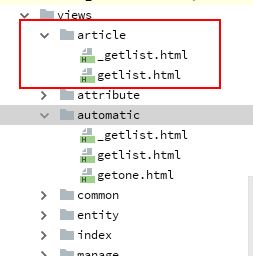
目的会很简单,就是解决增加一个字段或或者增加一个模块编码的工作,能否定制化使用?
今天我们就来解决这个问题:
为了开发,我们需要做好前期准备工作:
数据库表
-- 属性表
DROP TABLE
IF EXISTS `attribute`;

CREATE TABLE `attribute` (
 `id` INT (11) NOT NULL AUTO_INCREMENT,
 `updateTime` datetime DEFAULT NULL,
 `createTime` datetime DEFAULT NULL,
 `state` INT (11) NOT NULL DEFAULT '0',
 `entityTypeID` INT (11) NOT NULL DEFAULT '0',
 `attributeName` VARCHAR (128) DEFAULT NULL,
 inputType VARCHAR (128) DEFAULT NULL,
 inputLabel VARCHAR (128) DEFAULT NULL,
 inputTitle VARCHAR (128) DEFAULT NULL,
 validateType VARCHAR (128) DEFAULT NULL,
 attributeOption VARCHAR (512) DEFAULT NULL,
 columnWidth INT (11) NOT NULL DEFAULT '0',
 editTable TINYINT (4) NOT NULL DEFAULT '0',
 orderTable TINYINT (4) NOT NULL DEFAULT '0',
 inEntity TINYINT (4) NOT NULL DEFAULT '0',
 finderInitShow TINYINT (4) NOT NULL DEFAULT '0',
 sort INT (11) NOT NULL DEFAULT '0',
 PRIMARY KEY (`id`)
) ENGINE = INNODB AUTO_INCREMENT = 1 DEFAULT CHARSET = utf8;

-- 属性集表
DROP TABLE
IF EXISTS `attributeset`;

CREATE TABLE `attributeset` (
 `id` INT (11) NOT NULL AUTO_INCREMENT,
 `updateTime` datetime DEFAULT NULL,
 `createTime` datetime DEFAULT NULL,
 `state` INT (11) NOT NULL DEFAULT '0',
 `entityTypeID` INT (11) NOT NULL DEFAULT '0',
 `attributeSetName` VARCHAR (128) DEFAULT NULL,
 finderInitShow TINYINT (4) NOT NULL DEFAULT '0',
 sort INT (11) NOT NULL DEFAULT '0',
 PRIMARY KEY (`id`)
) ENGINE = INNODB AUTO_INCREMENT = 1 DEFAULT CHARSET = utf8;

-- 属性集关联表
DROP TABLE
IF EXISTS `entityattribute`;

CREATE TABLE `entityattribute` (
 `id` INT (11) NOT NULL AUTO_INCREMENT,
 `updateTime` datetime DEFAULT NULL,
 `createTime` datetime DEFAULT NULL,
 `state` INT (11) NOT NULL DEFAULT '0',
 `entityTypeID` INT (11) NOT NULL DEFAULT '0',
 `attributeSetID` INT (11) NOT NULL DEFAULT '0',
 attributeGroupID INT (11) NOT NULL DEFAULT '0',
 attributeID INT (11) NOT NULL DEFAULT '0',
 inputLabel VARCHAR (128) DEFAULT NULL,
 finderInitShow TINYINT (4) NOT NULL DEFAULT '0',
 sort INT (11) NOT NULL DEFAULT '0',
 PRIMARY KEY (`id`)
) ENGINE = INNODB AUTO_INCREMENT = 1 DEFAULT CHARSET = utf8;
选择下拉框
<select class="select required" name="inputType" size="1">
   <option value="">- 请选择 -</option>
             <option {$model && $model.inputType =='text'?"selected='selected'":""} value="text">Text(文本)</option>
             <option {$model && $model.inputType =='textreadonly'?"selected='selected'":""} value="textreadonly">TextReadOnly(只读文本)</option>
             <option {$model && $model.inputType =='textarea'?"selected='selected'":""} value="textarea">TextArea(文本域)</option>
             <option {$model && $model.inputType =='select'?"selected='selected'":""} value="select">Select(下拉菜单)</option>
             <option {$model && $model.inputType =='radio'?"selected='selected'":""} value="radio">Radio(单选按钮)</option>
             <option {$model && $model.inputType =='checkbox'?"selected='selected'":""} value="checkbox">Checkbox(多选按钮)</option>
             <option {$model && $model.inputType =='hidden'?"selected='selected'":""} value="hidden">Hidden(隐藏域)</option>
             <option {$model && $model.inputType =='date'?"selected='selected'":""} value="date">Date(日期)</option>
             <option {$model && $model.inputType =='dateyear'?"selected='selected'":""} value="dateyear">Date(年份)</option>
             <option {$model && $model.inputType =='file'?"selected='selected'":""} value="file">File(文件上传)</option>
             <option {$model && $model.inputType =='editor'?"selected='selected'":""} value="editor">富文本编辑器</option>
             <option {$model && $model.inputType =='mobileeditor'?"selected='selected'":""} value="mobileeditor">移动端富文本编辑器</option>
</select>
验证规则
系统中集成了 thinkphp的验证规则,我这里采用多选的方式进行呈现
<div class="row cl">
         <label class="form-label col-xs-4 col-sm-2">验证类型:</label>
         <div class="formControls col-xs-8 col-sm-9"> <span class="select-box" style="width:150px;">
<select class="select" name="validateType" size="1">
   <option {$model && $model.validateType ==''?"selected='selected'":""} value="">- 请选择 -</option>
             <option {$model && $model.validateType =='required'?"selected='selected'":""} value="required">required(必填)</option>
             <option {$model && $model.validateType =='number'?"selected='selected'":""} value="number">number(数值)</option>
             <option {$model && $model.validateType =='s'?"selected='selected'":""} value="s">string(字符串)</option>
             <option {$model && $model.validateType =='m'?"selected='selected'":""} value="m">phone(手机号)</option>
             <option {$model && $model.validateType =='url'?"selected='selected'":""} value="url">url(网址)</option>
</select>
</span></div>
     </div>
php代码
public function edit($categoryId = 0, $id = 0)
{
    $attributeListData = array();
    $model = null;
    if ($id > 0) {
        $model = Article::get($id);
    }
    $category = null;
    if ($categoryId > 0) {
        $category = ArticleCategory::get($categoryId);
        if ($category != null && $category->attributeSetID > 0) {
            $entityAttributeList = EntityAttribute::Where('attributeSetID', $category->attributeSetID)->order('sort', 'desc')->select()->toArray();
            $entityAttArry = array();
            $entityAttributeDic = array();
            foreach ($entityAttributeList as $k => $v) {
                $entityAttArry[] = $v['attributeID'];
                $entityAttributeDic[$v['attributeID']] = $v;
            }
            $attributeList = Attribute::Where('id', 'in', $entityAttArry)->select()->toArray();
            foreach ($attributeList as $key => &$value) {
                $value['inputLabel'] = $entityAttributeDic[$value['id']]['inputLabel'];
                $value['sort'] = $entityAttributeDic[$value['id']]['sort'];
            }
            array_multisort(array_column($attributeList, 'sort'), SORT_ASC, $attributeList);
            $attributeListData = $attributeList;
        }
    }
    $this->assign('model', $model);
    $this->assign('category', $category);
    $this->assign('attributeList', $attributeListData);
    return view();
}


public function save($categoryId = 0,$id=0)
{
    if (request()->isPost()) {
        $result = 0;
        $category = ArticleCategory::get($categoryId);
        if ($id > 0) {
            $propertyNames = array();
            if ($category != null) {
                $attributeIdArry = EntityAttribute::Where('attributeSetID', $category->attributeSetID)->column("attributeID");
                $propertyNames = Attribute::Where('id', 'in', $attributeIdArry)->where('inEntity',['=', 0], ['=', 1],'or')->column('attributeName');
            }
            $article = new  Article();
            if ($category->isAudit == 0){
                $_POST['published'] = date('Y-m-d H:i:s');
                $_POST['state'] = 1;
                array_push($propertyNames,'published');
                array_push($propertyNames,'state');
            }
            $result = $article->allowField($propertyNames)->save($_POST, ['id' => $id]);
        } else {
            $article = new Article($_POST);
            if ($category->isAudit == 0){
                $article->published = date('Y-m-d H:i:s');
            }
            $article->createTime = date('Y-m-d H:i:s');
            $result = $article->allowField(true)->save();
        }
        if ($result > 0) {
            $returnResult = ReturnResult::ShowSucess('',url('@admin/Article/index'));
            return json($returnResult);
        }
    }
    $returnResult = ReturnResult::Failed();
    return json($returnResult);
}
页面展示
通过遍历展现出来:
{if condition="sizeof($attributeList)>0"}
<div class="page-container">
    <form action="{:url('Article/sava',['id'=>$model?$model.id:''])}" method="post" class="form form-horizontal"
          id="form-attribute-edit">
        <div id="msg" class='c-red col-sm-offset-3' style='margin-bottom:5px; display: none'><span
                id="tipMessage"></span></div>
        {volist name="attributeList" id="attribute"}

        {if condition="$attribute.inputType == 'hidden'"}
        <input type="hidden" name="{$attribute.attributeName}" value="{$model[$attribute.attributeName]}"/>
        {/if}

        {if condition="$attribute.inputType == 'text'"}
        <div class="row cl">
            <label class="form-label col-xs-4 col-sm-2">
                {eq name="attribute.validateType" value="required"}<span class="c-red">*</span>{/eq}
                {$attribute.inputLabel}:</label>
            <div class="formControls col-xs-8 col-sm-9">
                <input type="text" class="input-text {$attribute.validateType}" name="{$attribute.attributeName}" value="{$model[$attribute.attributeName]}"/>
            </div>
        </div>
        {/if}

        {if condition="$attribute.inputType == 'textreadonly'"}
        <div class="row cl">
            <label class="form-label col-xs-4 col-sm-2">{$attribute.inputLabel}:</label>
            <div class="formControls col-xs-8 col-sm-9">
                {if condition="$attribute.attributeName == 'categoryId'"}
                <input type="hidden" name="categoryId" value="{$category.id}"/>
                <select style="width: 150px;" class="select" >
                    <option value="">{$category.categoryName}</option>
                </select>
                {else  /}
                <input type="hidden" name="{$attribute.attributeName}" value="{$model[$attribute.attributeName]}"/>
                <input type="text" readonly="readonly" name="{$attribute.attributeName}" value="{$model[$attribute.attributeName]}"/>
                {/if}
            </div>
        </div>
        {/if}

        {if condition="$attribute.inputType == 'textarea'"}
        <div class="row cl">
            <label class="form-label col-xs-4 col-sm-2">
                {$attribute.inputLabel}:</label>
            <div class="formControls col-xs-8 col-sm-9">
                <textarea name="{$attribute.attributeName}" cols="" rows="" class="textarea {$attribute.validateType}"  dragonfly="true">{$model[$attribute.attributeName]}</textarea>
            </div>
        </div>
        {/if}
2019年8月13日22:17:47 在这天,基本上已经开发完毕
前后端都是可以提供自定义开发配置的,倘若要开发新的功能,只需要复制同名的controller 在里面编写自己的方法,即可实现自己的方法。
前端页面也是一样,需要复制出 views 目录下 同名的module名,比如说 article,复制文件夹,编写自己的模板文件,如 getlist _getlist.html 这两个文件
这还不算完成,需要复制 static/dev/automatic 这个文件夹,改名 article
下面我们提供一个前端代码复用的功能:
步骤如下:
1、复制static/automatic/ 到 module/article
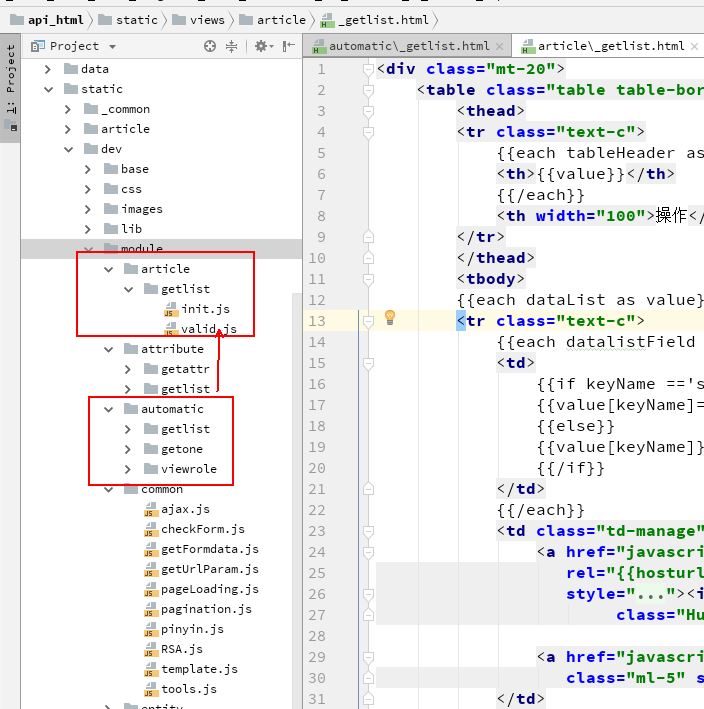
define(function (require, exports) {

    var ajax = require('module/common/ajax').ajax;


    var getFromdata = require('module/common/getFormdata').getFromdata;

    var jsTemplate = require('module/common/template');

    var automaticGetList = require('module/automatic/getlist/valid');

    exports.init = function () {


         automaticGetList.init();

    };


});
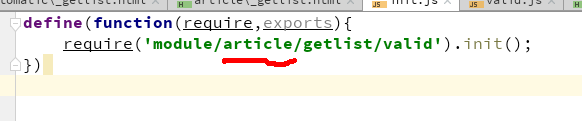
代码改成这样,即可,大部分功能是复用了 automatic/getlist/valid 中的init方法
打开 init.js 把代码改成
第二步:复制html,必须和automatic中的文件名保持一致,否则 不会走自定义的文件