可以打开 http://www.nginx.cn 这个网站学习
如何配置nginx下多个网站:
以建立 a网站和b网站为例
[root@bogon conf]# pwd
/usr/local/nginx/conf
在这个目录下新建一个 vhosts 的文件夹 来存储 * .conf 配置文件
mkdir vhosts 稍后来保存文件
vim nginx.conf 打开这个文件,复制 一个
server {
listen 80;
server_name a.com www.a.com;
#charset koi8-r;
#access_log logs/host.access.log main;
location / {
root html;
index index.html index.htm;
}
#error_page 404 /404.html;
# redirect server error pages to the static page /50x.html
#
error_page 500 502 503 504 /50x.html;
location = /50x.html {
root html;
}
# proxy the PHP scripts to Apache listening on 127.0.0.1:80
#
#location ~ \.php$ {
# proxy_pass http://127.0.0.1;
#}
# pass the PHP scripts to FastCGI server listening on 127.0.0.1:9000
#
location ~ \.php$ {
root html;
fastcgi_pass 127.0.0.1:9000;
fastcgi_index index.php;
fastcgi_param SCRIPT_FILENAME /usr/local/nginx/html/$fastcgi_script_name;
include fastcgi_params;
}
# deny access to .htaccess files, if Apache's document root
# concurs with nginx's one
#
#location ~ /\.ht {
# deny all;
#}
}
复制以上代码,进入vhosts ,
cd vhosts
vim a.com.conf
然后粘贴进来
:x 或 :wq 保存退出。
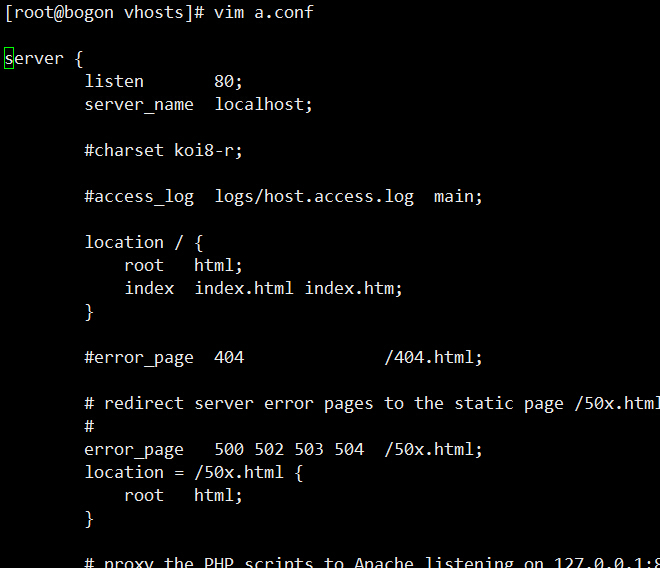
这就是复制的代码,这样vhosts这个目录下面就多了一个 a.com.conf 这样的一个文件。
按照上面的方法,建立 b.com.conf
vim b.com.conf
同样粘贴上面的代码:
server {
listen 80;
server_name b.com www.b.com;
#charset koi8-r;
#access_log logs/host.access.log main;
location / {
root html;
index index.html index.htm;
}
#error_page 404 /404.html;
# redirect server error pages to the static page /50x.html
#
error_page 500 502 503 504 /50x.html;
location = /50x.html {
root html;
}
# proxy the PHP scripts to Apache listening on 127.0.0.1:80
#
#location ~ \.php$ {
# proxy_pass http://127.0.0.1;
#}
# pass the PHP scripts to FastCGI server listening on 127.0.0.1:9000
#
location ~ \.php$ {
root html;
fastcgi_pass 127.0.0.1:9000;
fastcgi_index index.php;
fastcgi_param SCRIPT_FILENAME /usr/local/nginx/html/$fastcgi_script_name;
include fastcgi_params;
}
# deny access to .htaccess files, if Apache's document root
# concurs with nginx's one
#
#location ~ /\.ht {
# deny all;
#}
}
保存退出
:x
或 :wq 退出。
再次打开nginx.conf 这个文件,在http{ } 这个花括号中引入这两个配置文件
代码如下:
# 包含所有的虚拟主机的配置文件
 include /usr/local/nginx/conf/vhosts/*;
这句代码的路径一定要写正确
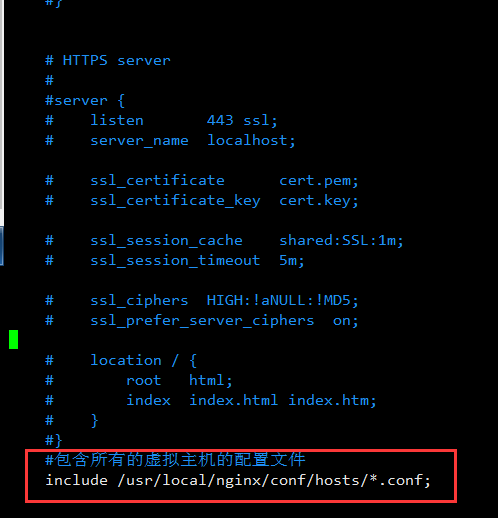
include /usr/local/nginx/conf/hosts/*.conf;
这样就可以了,
使用 service nginx restart
或 ./nginx -s reload 这样的命令重新启动nginx服务器
这样就可以操作了。
server {
        listen       80;
        client_max_body_size 100m;
        server_name xiaosongit.com www.xiaosongit.com;
        index index.php index.html;
        root  /data/www/weixin;
        #error_page 404 = /404/index.html;
        location / {
            root   /data/www/weixin;
            index  index.html index.php index.htm;
            #rewrite "/admin.html" /index.php?a=admin  last;
            #rewrite "/download.html" /index.php?a=list&m=download  last;
            #rewrite "/wxbm.html" /index.php?a=fhys&m=index last;
            #rewrite "/qddh.html" /index.php?a=dahui&m=index last;
            #rewrite "/wxbm-en.html" /index.php?a=fhys&m=index_english  last;
            #rewrite "/wxbm_en.html" /index.php?a=fhys&m=index_english  last;
            #rewrite "/chanyezhou.html" /index.php?a=index&m=z  last;
        }


        location ~ .*\.(jpg|jpeg|png|gif|js|css)$ {
                expires 1d;
        }
        location ~ \.php(/|$) {
                fastcgi_pass   127.0.0.1:9054;
                fastcgi_index  index.php;
                fastcgi_split_path_info ^(.+\.php)(.*)$;
                fastcgi_param PATH_INFO $fastcgi_path_info;
                fastcgi_param  SCRIPT_FILENAME  $document_root$fastcgi_script_name;
                include        fastcgi_params;
        }
}