系统默认目录没有固定的模式,可以随心所欲的去设计。
前提是需要进行掌握好
DI模式
自动加载
设置控制器
模板等方式
项目路径:
phalcon 没有严格的目录格式是什么样的,建议大家使用这个格式建立目录
 app/
     controllers/
     models/
     views/
 public/
     css/
     img/
     js/
以上目录可以手动建立
先看下目录吧:
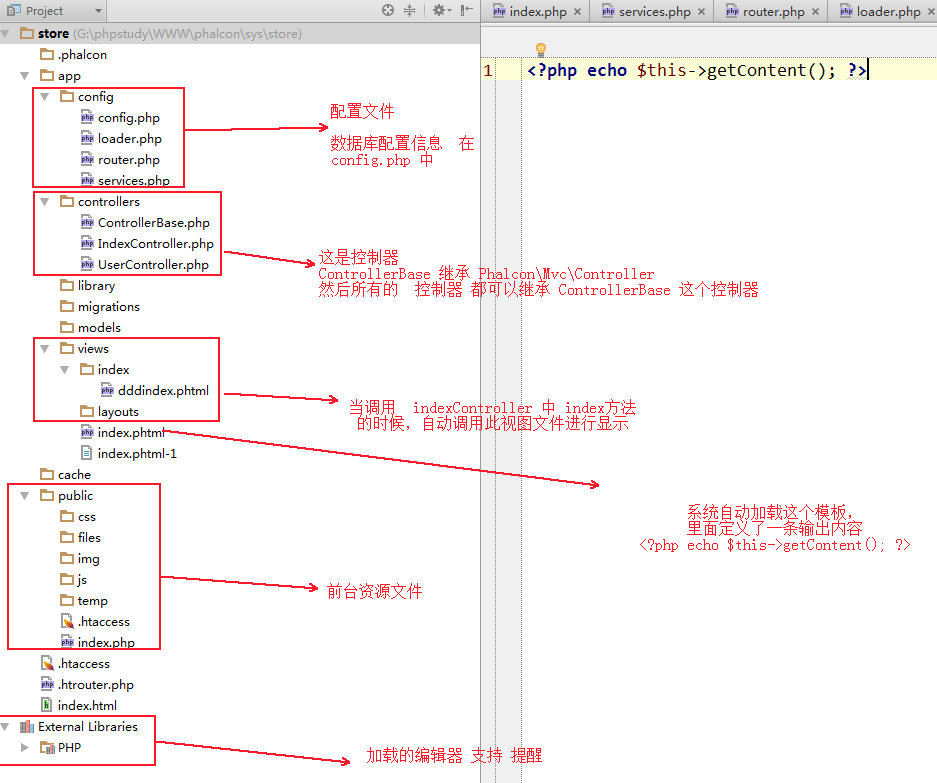
或者使用命令行进行建立 命令: phalcon create-project store
通过命令行 建立 Controller:
phalcon create-controller --name test
请参考
新项目 phalcon 安装
详细讲解了 phalcon 的安装方式
自建目录注意事项:
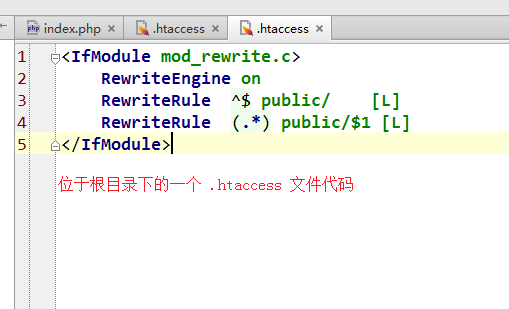
在根目录下 .htaccess 一个文件 在 public/.htaccess 一个文件
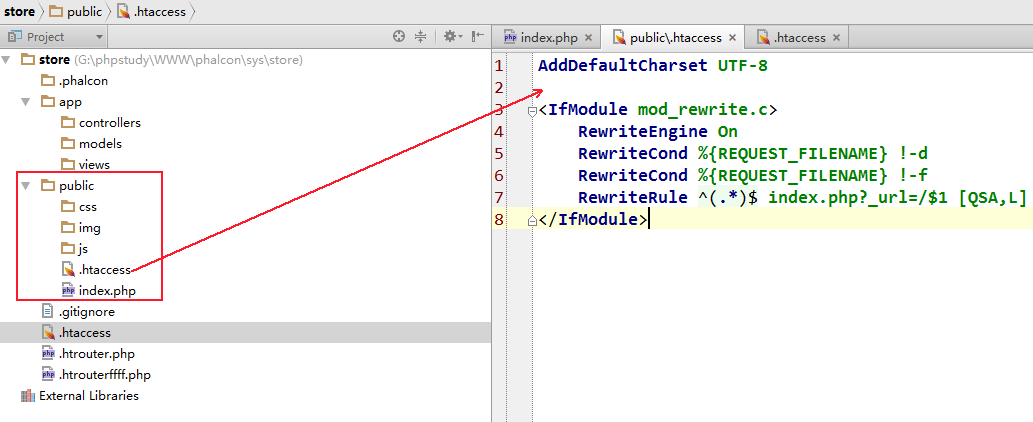
还需要有一个 .htrouter.php
这样的话,系统直接访问根目录,自动会跳转到 public/index.php 这里
1、启动入口 /public/index.php
use Phalcon\Loader;
use Phalcon\Di\FactoryDefault;
use Phalcon\Mvc\Application;
use Phalcon\Mvc\View;
use Phalcon\Mvc\Url as UrlProvider;
use Phalcon\Db\Adapter\Pdo\Mysql as Db;

define('BASE_PATH',dirname(__DIR__));
define('APP_PATH',BASE_PATH.DIRECTORY_SEPARATOR.'app');
try{
    //注册自动加载
    $loader=new Loader();
    $loader->registerDirs(
        [
            APP_PATH.'/controllers',
            APP_PATH.'/models'
        ]
    )->register();

    //创建一个DI 对象 大管家
    $di=new FactoryDefault();

    //设置view  声明一个view对象 并返回   像 动态注入功能
    $di['view']=function(){
        $view=new View();
        $view->setViewsDir(APP_PATH.'/views/');
        return $view;
    };

    //设置 基准的URL
    $di['url']=function(){
      $url=new UrlProvider();
      $url->setBaseUri('/');
        return $url;
    };

    //设置session
    $di->set('session',function() use ($configs){
            $session=new Phalcon\Session\Adapter\Files();
            $session->start();
            return $session;
        });

    //设置数据库
    $di['db']=function(){
        return new Db(
            [
                'host'=>'127.0.0.1',
                'username'=>'root',
                'password'=>'song',
                'dbname'=>'test'
            ]
        );
    };
    $application=new Application($di);
    echo $application->handle()->getContent();


} catch (\Phalcon\Exception $e) {
    echo $e->getMessage() . '<br>';
    echo '<pre>' . $e->getTraceAsString() . '</pre>';
}
这是入口文件的写法
一、自动加载 (Autoloaders)
我们使用了 Phalcon\Loaders 组件 它用户加载控制器和模型类
 //注册自动加载
    $loader=new Loader();
    $loader->registerDirs(
        [
            APP_PATH.'/controllers',
            APP_PATH.'/models'
        ]
    )->register();
二、依赖管理
这是Phalcon非常重要的一个概念(FactoryDefault()) 听起来很复杂,但用起来还是比较简单的。
看下面的例子:
服务器容器是一个全局存储的将要被程序使用的程序包。
每次框架需要一个组件时,会请求这个协定好的名称的服务容器。
Phlcon是一个高度解耦的框架
Phlcon/DI 是一个粘合剂 使用不同的组件集成。
Phalcon\Di\FactoryDefault 是 Phalcon\DI 的一个变体,为了让事件更加容易,它注册了Phalcon的大多组件。
use Phalcon\Di\FactoryDefault;

//创建一个DI 对象 大管家
    $di=new FactoryDefault();

    //设置view  声明一个view对象 并返回   像 动态注入功能
    $di['view']=function(){
        $view=new View();
        $view->setViewsDir(APP_PATH.'/views/');
        return $view;
    };

    //设置 基准的URL
    $di['url']=function(){
      $url=new UrlProvider();
      $url->setBaseUri('/');
        return $url;
    };

    //设置数据库
    $di['db']=function(){
        return new Db(
            [
                'host'=>'127.0.0.1',
                'username'=>'root',
                'password'=>'song',
                'dbname'=>'test'
            ]
        );
    };
三、注册View服务
指示框架去指定的目录寻找视图文件,由于视图并非PHP类,它们不能被自动加载器加载。
四、依赖注入
    $di['view']=function(){
        global $configs;
        $view=new View();
        $view->setViewsDir($configs->application->viewDir);
        return $view;
    };


    $di->set('view', function() {
        global $configs;
        $view=new View();
        $view->setViewsDir($configs->application->viewDir);
        return $view;
    });

  以上这两种方法都是可以注入变量的。
五、session是如何使用的 依赖注入session
说明 session 支持 redis 、memcache、file、Libmemcached
$di->set('session', function() {
    $session = new Phalcon\Session\Adapter\Files();
    $session->start();
    return $session;
});
现在有一个问题需要说明一下
使用匿名函数的时候,$configs
会出现红线 解决的办法有两种:
第一种: 要么使用 global $configs
$di->set('view', function() {
        global $configs;
        $view=new View();
        $view->setViewsDir($configs->application->viewDir);
        return $view;
    });
第二种: use ($configs)
 $di->set('view', function() use($configs) {
    $view=new View();
    $view->setViewsDir($configs->application->viewDir);
    return $view;
});
2、控制器 Controller
controllers/IndexController.php
#控制器的写法

/**
 * Created by PhpStorm.
 * User: Administrator
 * Date: 2018/3/31
 * Time: 8:29
 */

use Phalcon\Mvc\Controller;
class IndexController extends Controller{


    public function indexAction(){
        echo 111;
    }


}
3、模型 Model
#模型的写法
模型的写法 模型 在 models/User.php
那么看看是如何写的啊
use Phalcon\Mvc\Model;
class Users extends Model{

}
就是这样写即可
controllers/IndexController.php
/**
 * Created by PhpStorm.
 * User: Administrator
 * Date: 2018/3/31
 * Time: 8:29
 */

use Phalcon\Mvc\Controller;
class IndexController extends Controller{
    //显示页面
    public function indexAction(){

    }
    //显示表单填写页面
    public function signupAction(){

        echo "signup";

    }
    //保存信息
    public function singupSaveAction(){

          //如何处理数据?

        //日志怎么使用

        //有没有钩子之类的功能

        $user = new Users();  //这里不使用任何的use  因为我们已经使用 Loader 自动加载引入了
        //$this->request->getPost(), array('name','email')
        $res=$user->save($this->request->getPost(),array("name","email"));
        var_dump($res); //如果插入成功后,返回  true  否则false
    }

}
看看view层
views/index/index.phtml
<?php

echo "<h1>Hello!</h1>";

echo Phalcon\Tag::linkTo("Index/signup", "Sign Up Here!");

?>

<?php echo $this->tag->linkTo("Index/signup", "Sign Up Here22222!"); ?>
views/index/signup.phtml
<?php use Phalcon\Tag; ?>
<h1>用户注册</h1>
<?php echo Tag::form("Index/singupSave"); ?>
<p>
    <label for="name"> Name </label>
    <?php echo Tag::textField("name") ?>
</p>
<p>
    <label for="email">E-Mail</label>
    <?php echo Tag::textField("email") ?>
</p>

<p>
    <?php echo Tag::submitButton("Register") ?>
</p>
</form>
4、视图层 VIew
视图层 保存在 views 这个目录下面
一般情况下 在 views 目录下 还会再建立 一个文件夹, 然后 文件夹 下面 会再次 建立 add.phtml index.pthml
那么就来一个页面:
<?php echo $this->tag->form('Index/add') ?>

<label for="email">Username/Email</label>
    <?php echo $this->tag->textField(array("email", "size" => "30")) ?>

<label for="password">Password</label>
    <?php echo $this->tag->passwordField(array("password", "size" => "30")) ?>

    <?php echo $this->tag->submitButton(array('Login')) ?>

</form>
5、配置文件
#配置文件所在的路径

//app/configs/  所有的配置文件全部放在这里
//系统支持ini 配置  看代码


#控制器如何配置数据库


#配置中主要的参数配置 或需要注意事项
6、访问数据库 增删改查 模型访问数据库
7、获取对象 post get session
 $this->request->getPost(); 获取全部post 中的数据  $_POST


 $this->request->getPost('email', 'email'); //只是获取 email 并通过email验证
1、session的使用
 需要使用session 必须在index.php 配置文件中配置

 $di 中添加

 $di->set('session',function() use ($configs){
    $session=new Phalcon\Session\Adapter\Files();
    $session->start();
    return $session;
});


 //设置session
 $this->session->set('auth', array(
        'id' => $user->id,
        'name' => $user->name
    ));

    //获取session
    $loginInfo=$this->session->get("auth");
    echo "欢迎-----".$loginInfo['name'];
8、业务逻辑代码
1、获取数据
//Receiving the variables sent by POST
$email = $this->request->getPost('email', 'email');
$password = $this->request->getPost('password');
$password = sha1($password);


//Find the user in the database  从数据库中查找一条信息
$user = Users::findFirst(array(
"email = :email: AND password = :password: AND active = 'Y'",
"bind" => array('email' => $email, 'password' => $password)
));
2、页面跳转
 $this->flash->success('Welcome ' . $user->name);

//Forward 页面跳转到  index/welcome 目录下
return $this->dispatcher->forward(array(
    'controller' => 'index',
    'action' => 'welcome'
));
3、$this->flash 是做什么用的?
$this->flash->success('Welcome ' . $user->name);

$this->flash->error('Wrong email/password');
9、CRUD 的使用
controllers/ProductController.php
class ProductsController extends ControllerBase{

    /**     * The start action, it shows the "search" view     */
    public function indexAction()
    {
        //...
    }

    /**     * Execute the "search" based on the criteria sent from the "index"     * Returning a paginator for the results     */
    public function searchAction()
    {
        //...
    }

    /**     * Shows the view to create a "new" product     */
    public function newAction()
    {
        //...
    }

    /**     * Shows the view to "edit" an existing product     */
    public function editAction()
    {
        //...
    }

    /**     * Creates a product based on the data entered in the "new" action     */
    public function createAction()
    {
        //...
    }

    /**     * Updates a product based on the data entered in the "edit" action     */
    public function saveAction()
    {
        //...
    }

    /**     * Deletes an existing product     */
    public function deleteAction($id)
    {
        //...
    }}
视图层:
   products/
                edit.phtml
                index.phtml
                new.phtml
                search.phtml
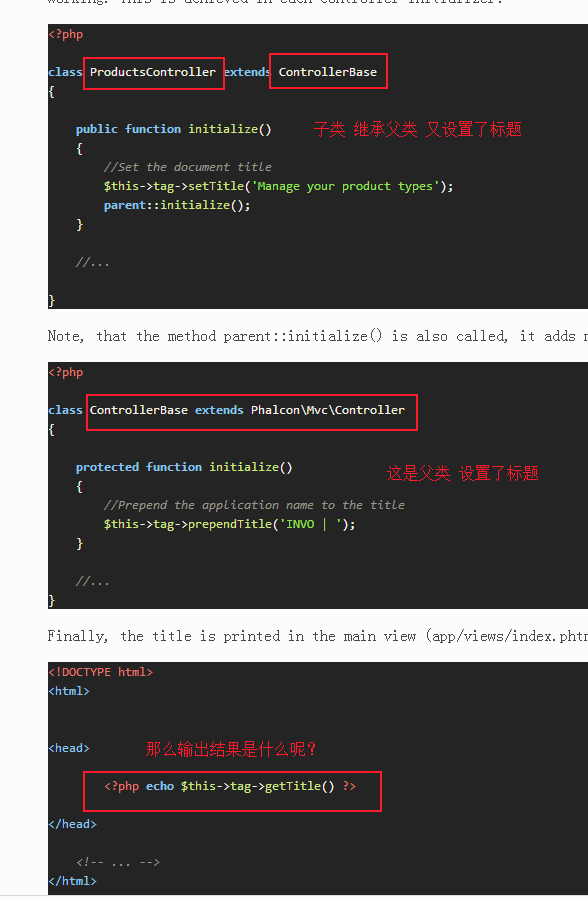
10、动态更改标题(Changing the Title Dynamically)
phalcon命名空间的使用
https://blog.csdn.net/qq_34335814/article/details/73201335
-------------------------------------------------------------------------------------------------------
本教程:
IT大叔 文档
https://www.itdashu.com/node_article/58e3f3b0c4afab06ae3f4b4e.html
phalcon3
http://docs.iphalcon.cn/
http://www.myleftstudio.com/
http://phalcon.ipanta.com/1.3/tutorial.html#creating-a-project