中间件是为了过滤一系列的http请求,比如验证后台登录
HTTP 中间件提供了为过滤进入应用的 HTTP 请求提供了一套便利的机制。
中间件:middleware
1、中间件的配置文件在哪里?
app\Http\kernel.php
2、如何创建自己的中间件?
照葫芦画瓢
打开app\Http\kernel.php 看以下代码

php artisan make:middleware AdminCheck 直接回车(在命令行中执行)
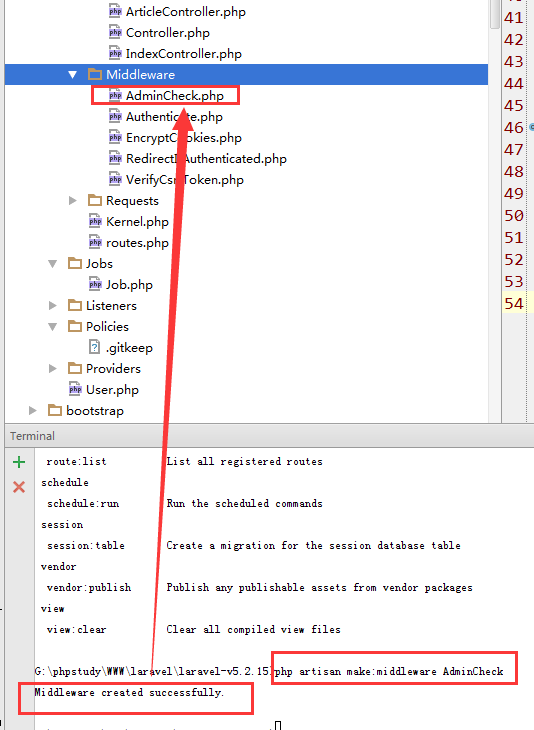
打开AdminCheck.php文件
<?php

namespace App\Http\Middleware;

use Closure;

class AdminCheck
{
    /**
     * Handle an incoming request.
     *
     * @param  \Illuminate\Http\Request  $request
     * @param  \Closure  $next
     * @return mixed
     */
    public function handle($request, Closure $next)
    {

        //在这里进行代码的判断,如登录信息啊,
        if(!session("key")){
            //code...
        }
        return $next($request);
    }
}
这是命令创建的文件,所有的判断代码在handle中去做处理
3、中间件创建成功后,如何使用啊?
打开 app/Http/routes.php
使用分组路由,并加上中间件,那么来看看是如何添加的
<?php

    //使用一个中间件,web
    Route::group(['middleware'=>'web'],function(){

        //多个路由方法

    });

    //使用多个中间件
     Route::group(['middleware'=>['web','adminCheck']],function(){

        //多个路由方法

    });


    //综合
    //使用prefix 可以省略在写路由的admin
    //Admin 这是放在Controller目录下的Admin
     Route::group(['prefix'=>'admin','namespace'=>'Admin','middleware'=>['web','adminCheck']],function(){

        Route::get('index',['uses'=>'UserController@index','as'=>'userIndex']);

        //多个路由方法

    });
这就是中间件,如还需了解路由规则,请点击 http://www.xiaosongit.com/index.php/Index/detail/id/127.html
artisan都有哪些命令呢? 通过 php artisan 命令查看
G:\phpstudy\WWW\laravel\laravel-v5.2.15>php artisan
Laravel Framework version 5.2.22
Usage:
command [options] [arguments]
Options:
-h, --help Display this help message
-q, --quiet Do not output any message
-V, --version Display this application version
--ansi Force ANSI output
--no-ansi Disable ANSI output
-n, --no-interaction Do not ask any interactive question
--env[=ENV] The environment the command should run under.
-v|vv|vvv, --verbose Increase the verbosity of messages: 1 for normal output, 2 for more verbose output and 3 for debug
Available commands:
clear-compiled Remove the compiled class file
down Put the application into maintenance mode
env Display the current framework environment
help Displays help for a command
list Lists commands
migrate Run the database migrations
optimize Optimize the framework for better performance
serve Serve the application on the PHP development server
tinker Interact with your application
up Bring the application out of maintenance mode
app
app:name Set the application namespace
auth
auth:clear-resets Flush expired password reset tokens
cache
cache:clear Flush the application cache
cache:table Create a migration for the cache database table
config
config:cache Create a cache file for faster configuration loading
config:clear Remove the configuration cache file
db
db:seed Seed the database with records
event
event:generate Generate the missing events and listeners based on registration
key
key:generate Set the application key
make
make:auth Scaffold basic login and registration views and routes
make:console Create a new Artisan command
make:controller Create a new controller class
make:event Create a new event class
make:job Create a new job class
make:listener Create a new event listener class
make:middleware Create a new middleware class
make:migration Create a new migration file
make:model Create a new Eloquent model class
make:policy Create a new policy class
make:provider Create a new service provider class
make:request Create a new form request class
make:seeder Create a new seeder class
make:test Create a new test class
migrate
migrate:install Create the migration repository
migrate:refresh Reset and re-run all migrations
migrate:reset Rollback all database migrations
migrate:rollback Rollback the last database migration
migrate:status Show the status of each migration
queue
queue:failed List all of the failed queue jobs
queue:failed-table Create a migration for the failed queue jobs database table
queue:flush Flush all of the failed queue jobs
queue:forget Delete a failed queue job
queue:listen Listen to a given queue
queue:restart Restart queue worker daemons after their current job
queue:retry Retry a failed queue job
queue:table Create a migration for the queue jobs database table
queue:work Process the next job on a queue
route
route:cache Create a route cache file for faster route registration
route:clear Remove the route cache file
route:list List all registered routes
schedule
schedule:run Run the scheduled commands
session
session:table Create a migration for the session database table
vendor
vendor:publish Publish any publishable assets from vendor packages
view
view:clear Clear all compiled view files